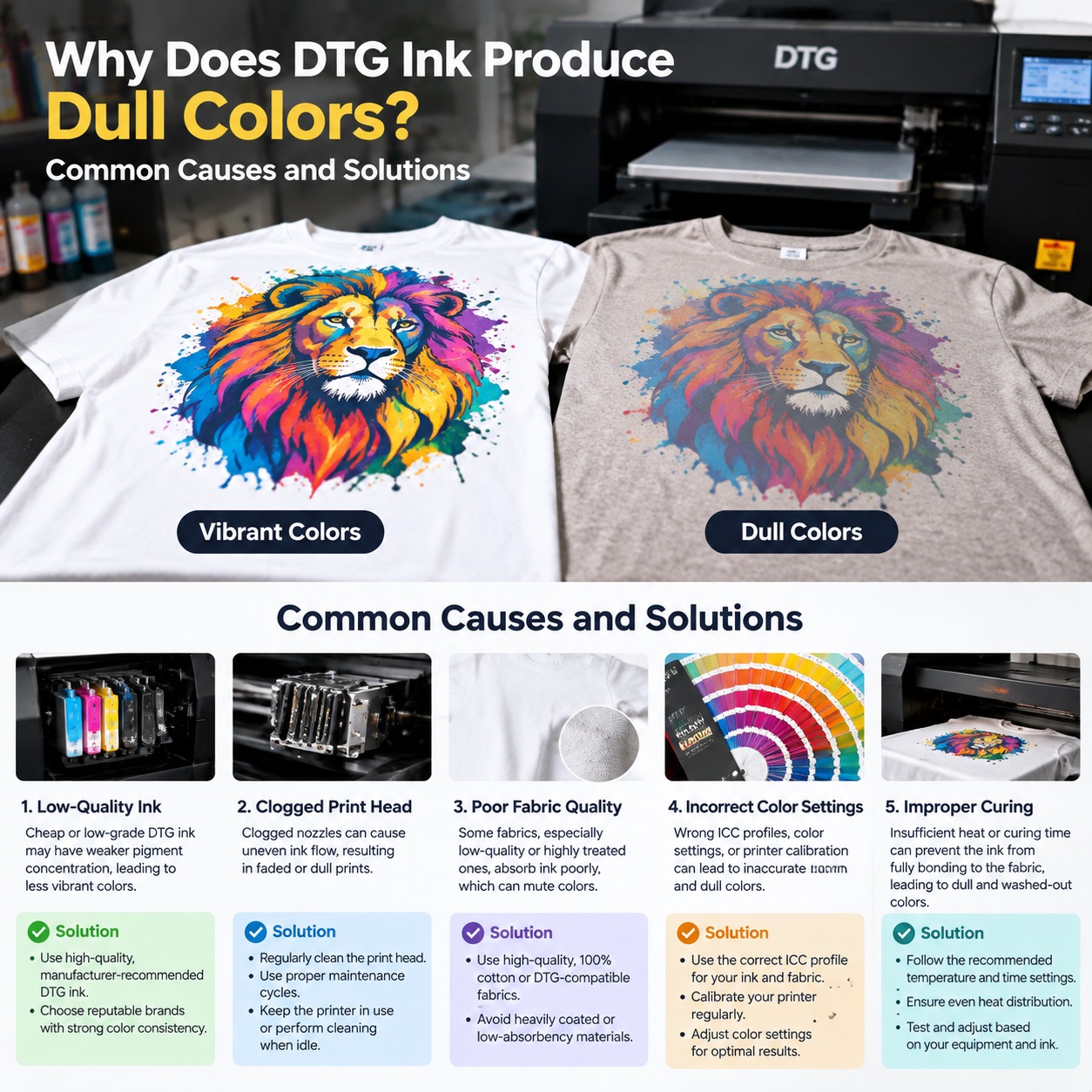
 Nine times out of ten, when a printer pulls a fresh shirt off the platen and mutters that the red looks like dried brick, the ink is innocent. I’ve watched this scene play out in shops from Portland to Tampa, and the culprit is almost always hiding somewhere upstream: in the pretreatment gun, in a neglected white ink line, in a curing station running 40 degrees cold, or in an ICC profile someone downloaded in 2019 and never touched again.
Direct-to-garment printing is unforgiving that way. Unlike screen printing, where you can brute-force vibrancy with a thick plastisol deposit, DTG asks everything to go right at once. Chemistry, humidity, fabric, software, and heat all have a vote. When one of them abstains, your colors pay the price.
So let’s walk through the real reasons DTG output goes flat, muddy, or chalky, and what to actually do about each one.
Start with the shirt, because the shirt starts the fight
Not all cotton is created equal, and the difference shows up in your print long before the first drop of ink lands.
Ring-spun cotton has a tight, smooth surface that lets ink sit up high and stay bright. Carded open-end cotton, the cheaper stuff, has a fuzzy, uneven face. Ink sinks into the fuzz, light scatters, and everything reads about 15 percent duller than your proof. If you’re printing on budget blanks, no amount of profile tweaking will fully close that gap.
Then there’s the blend problem. Anything with polyester in it, even 35 percent, introduces dye migration. The disperse dyes in the poly can sublimate upward through your white underbase during curing, giving you a gray or pinkish haze that kills saturation. You’ll need a low-bleed white ink and a lower curing temperature, or you’re fighting a losing battle.
One more thing people forget: fabric softeners and silicone finishes. Some garment suppliers treat shirts with them. They feel great in the hand and they repel water-based DTG ink like a raincoat. If you can’t get color to anchor at all, wet a scrap of the shirt and see if water beads up. If it does, change blanks.
Pretreatment is where most vibrancy goes to die
Ask any experienced DTG operator what causes dull prints and pretreatment will come up within ten seconds.
Too little pretreatment and the ink sits on top of the fibers instead of bonding into them. You get a print that looks washed out from the moment it exits the dryer, and it fades further after the first laundry cycle.
Too much pretreatment is just as bad, and it’s the more common mistake. Oversaturating the shirt leaves a sticky residue that yellows under heat, dulls white ink, and creates a stiff, plastic-y hand. The colors go milky. Reds turn coral. Blacks turn charcoal.
The fix is boring but effective: use a proper spray gun with a consistent pass pattern, weigh your shirts if you can, and dial in a target of roughly 25 to 35 grams per dark garment depending on size. Lighter garments need far less. Then dry the pretreatment completely before printing. If the shirt still feels cool or damp to the touch, you’re not done.
Also, check your pretreatment’s age and storage. It has a shelf life, and a bottle that’s been sitting in a hot back room since last summer will not perform like a fresh one.
Your white underbase is the foundation, and foundations crack
On dark garments, the white underbase does 80 percent of the work for color vibrancy. If that white isn’t opaque, everything printed on top of it is compromised.
Common failures here:
White ink that hasn’t been circulated or agitated. Titanium dioxide settles. If your printer sits overnight and you don’t run a circulation cycle before the first job, you’re printing thin, pigment-starved white for the first several shirts.
Too few white passes. Two passes might be enough on a tight ringspun tee. On a heavy or textured garment, you may need three or four. Test it. Pull the shirt after the white lays down and look at it under good light. If you can see fabric texture through the white, your colors will be muddy.
White ink that’s past its prime. Old white ink gets chunky and prints unevenly. It also loses opacity. Track your batch dates.
Curing temperature and time, the silent saturation killer
Undercured ink looks fine coming off the platen. Then it washes out, and the customer blames you.
But undercuring also affects color before washing. Incompletely fused ink has a rougher surface, and rough surfaces scatter light. That scattered light reads as dullness. Your cyan looks dusty. Your magenta looks muted.
The standard target for most water-based DTG inks is 320 to 360 degrees Fahrenheit at the ink film for 30 to 60 seconds, but your specific ink manufacturer’s spec sheet wins over any number you read online. Use a heat gun or a temperature strip to verify what’s actually happening on the platen, not what the dial says.
Overcuring is the mirror problem. Push a shirt too hot and you scorch the cotton, yellow the pretreatment, and shift your whites toward cream. That yellow cast drags every color down with it.
Printhead health and the quiet loss of density
A partially clogged printhead doesn’t usually fail dramatically. It just prints lighter. You lose a few nozzles in the cyan channel, the RIP compensates by firing more drops through the remaining ones, and the result is banding, uneven coverage, and a general loss of punch.
Run a nozzle check every morning. Not every week. Every morning. And keep your capping station clean and your wiper blade fresh. A machine that’s maintained properly prints measurably more vibrant than one that isn’t, with the exact same ink and profile.
RIP settings and profiles, the part nobody wants to learn
This is where a lot of shops leave real money on the table.
Default profiles shipped with a printer are built for generic conditions. Your shop has specific humidity, specific blanks, and specific pretreatment. If you’re not building or at least customizing profiles for your setup, you’re accepting someone else’s average.
Things to check:
Ink limits set too low. This caps how much ink goes down, which caps your color density.
Wrong profile for the fabric type. A profile built for ringspun cotton will over-ink a carded shirt and under-ink a poly blend.
RGB-to-CMYK conversion happening in the wrong place. Let the RIP handle it, not the design software.
Rendering intent. Perceptual and relative colorimetric produce very different results on saturated colors. Test both on your actual substrate.
If color accuracy matters to your business, invest in a spectrophotometer and learn to use it. It’s not glamorous. It is effective.
Your shop environment is a variable you can actually control
DTG ink behaves differently at 30 percent humidity than it does at 70 percent. Low humidity dries ink in the lines and reduces drop volume. High humidity slows curing and can cause the pretreatment to stay tacky.
Aim for 45 to 60 percent relative humidity and a shop temperature between 68 and 75 degrees. A cheap hygrometer will tell you more about your color problems than an hour of staring at test prints.
When the colors still look wrong, troubleshoot in this order
Print a test shirt with a known-good file on a known-good blank. Then change one variable at a time: pretreatment batch, white ink batch, curing time, profile. Do not change three things at once and hope.
Nine times out of ten, you’ll find the problem in the first three checks. The other one time, it’s your ink supply, and that’s when it pays to buy from a vendor who publishes real technical data, provides profiles for your printer model, and answers the phone when you call.
Cheap ink is only cheap until you’ve reprinted the same order twice and eaten the cost of both.
Get your pretreatment, white base, curing, and profiles locked in, and DTG colors will surprise you with how much life they actually have.